
Centralized SDS repository and manager
The solution for HSE, H&S, Sustainability Manager, Reach and Regulatory Manager, R&D Team
Centralized storage, organized management and control of the Safety Data Sheets (SDS) in use in your company
SDS archive and inventory of hazardous substances
The software to keep track of chemicals
SDS-Drive is the cloud-based module of SDS-FullService dedicated to the storage and management of Safety Data Sheets.
The information contained in the SDSs is indexed and made searchable, transforming the archive into a structured chemical inventory of substances and mixtures.
This allows you to perform checks, apply monitoring lists, and generate reports. The chemical inventory can be organized and consulted by site, product line, and department, with the option of associating SDSs with operational contexts (e.g., areas of use or tasks).
An organized and manageable digitalized system that has been supporting companies across all sectors for over 15 years helping them comply with regulations and ensure a safe and sustainable working environment.
A specialized system: simple, effective, and reliable.
(You must accept "Experience" cookies to view the video properly)
WHAT YOU CAN DO WITH SDS-DRIVE
- Centralized management of SDSs in a single archive where you can receive and manage documents for the entire company
- Immediate access to vital information on hazardous substances and mixtures
- SDS always up to date and available to all workers
- Identification of substances included in watchlists and continuous monitoring
- Guided path and tracking of SDSs in the company with simplified controls
- Communication and collaboration with suppliers
- Generation of reports with constantly updated data for customers, auditors, or supervisory authorities
The solutions, which are available in the cloud, are designed, developed and delivered according to a certified Information Security Management System ISO27001.

SDS-FullService's centralized SDS repository and management system
Summary of the main features of SDS-Drive
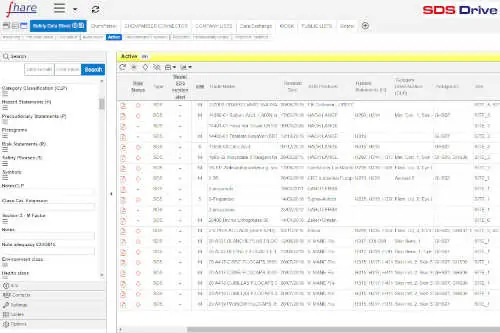
All SDSs in a single repository
Put SDSs in order and find everything you are looking for right away.

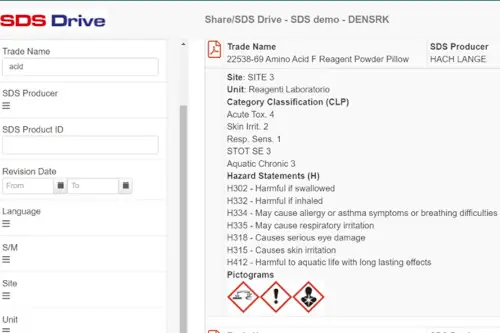
Automatic data extraction from SDSs for enhanced analysis
Automatically extract salient information from SDSs to work more smoothly.
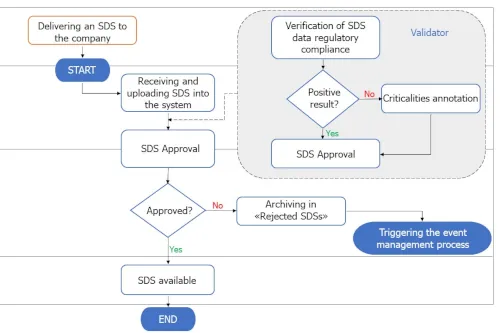
Improved control of internal processes
Set up structured processes to have full control over the SDSs received.
View the differences between a new version of an SDS and previous versions.
Effective management of SDS availability in the company
Make Safety Data Sheets available to the users, sites and departments involved.
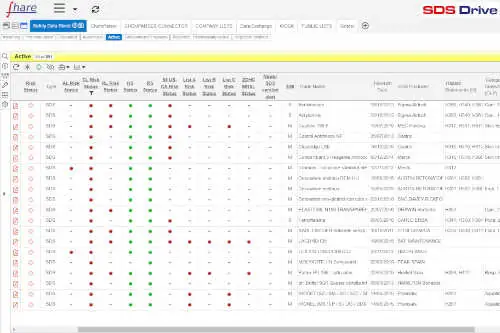
Control of hazardous substances
Expand the possibilities of analyzing SDS data by cross-referencing them with those from public or private databases.

Supplier Collaboration
Tracked communication with suppliers to request missing SDSs or updates to them, report nonconformities, and collect declarations of conformity.

Data Export and Reporting
Export data in various formats and generate reports either on demand or on a scheduled basis

API / Web Services
Integration with other enterprise applications via API / Web Services
Let's take a look at how to manage your SDSs
We'll show you SDS-FullService in action with your actual documents
Your SDSs in one place: searchable archive and revision management
SDSs are the primary source for compiling a reliable chemical inventory
With SDS-Drive, the SDS-FullService document collector and manager, you can transform your collection of Safety Data Sheets from "scattered PDFs" into a single controlled entry point: each SDS is archived, organized, and made immediately available according to your company's operating logic.
Archiving is based on configurable panels, which you can structure according to progress in the approval workflow, product type, confidentiality levels, and classification criteria. This not only gives you order, but also traceability: you always know where an SDS is in the process and which version is the correct one "in use."
To support revision management, each panel includes an "Obsolete" section, dedicated to versions replaced by new revisions, which is useful for the ten-year retention period required by law. There is also a section for products no longer in use, to distinguish operational archives from historical ones while maintaining consultability and traceability over time.
Flexible SDS receipt: you can manually upload individual PDFs and ZIP files, or set up a direct receipt flow from suppliers authorized to send them independently, while maintaining control and traceability of the process.
Custom fields: you can add extra information, even if not present in the SDS, either manually or automatically via API/Web Services (e.g., company codes, environmental/health/safety assessment notes, or any metadata necessary for your business process).
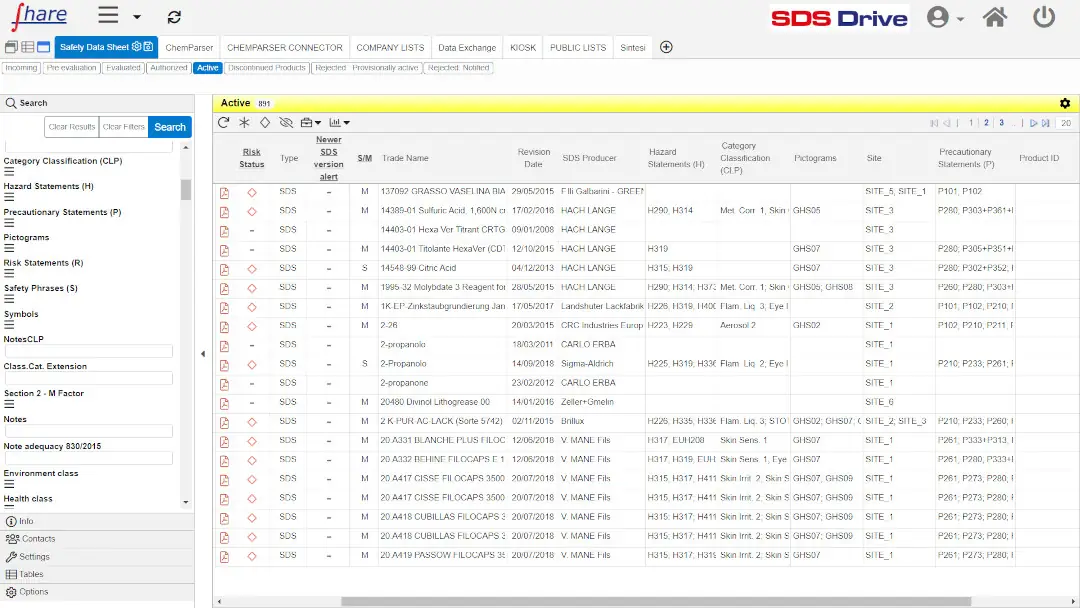
Each document in SDS-Drive is also indexed and therefore searchable by combining key data and available metadata, for example:
-
-
- Name of manufacturer
- Name of the substance or mixture
- Substance identification codes (EINECS, CAS Number and Index)
- REACH registration number
- Date of revision
- H-statements (Hazard statements) and P-statements (precautionary statements)
- Pictograms
- Components of mixtures
- Range % (for mixtures)
- CLP Category Classification
- … and other criteria useful for consultation and control.
-
Enhanced data analysis: automatic SDS extraction and indexing
TURN SAFETY DATA SHEETS INTO STRUCTURED DIGITAL DATA
(You must accept "Experience" cookies to view the video properly)
SDS-FullService is able to associate each document with the information it contains thanks to our technologies of automatic extraction and indexing of the data.
Indexing works by transforming SDS into easily searchable and assessable digital data, making SDS a tool with which to work easily.
Data are not entered manually (a highly time-consuming activity) but are automatically extracted from SDSs using ChemParser, a technology specifically developed to drastically reduce the time and errors associated with manual data entry.
We extract data from sections 1, 2, and 3 of the SDS (additional information can be extracted based on specific requests) and integrate it with the data necessary for your management process or, for example, with information useful for the prevention and assessment of chemical risk.
What data is automatically extracted from the Safety Data Sheets (SDS)?
Below is a table showing the “standard” data extracted by section
Additional information can be obtained based on specific requests made by client companies

Section 1
Identification
- Name of the substance or mixture (trade name, mixture name)
- Date of revision
- Language
- Product Type (Substance/Mixture)
- Name of manufacturer
- UFI Code
- Relevant identified uses and uses advised against
Section 2
Hazard Identification
- CLP Classification/Category
- Pictograms
- Signal word
- H-statements (hazard statements)
- P-statements (precautionary statements)
Section 3
Composition / information on ingredients
- Substance name/designation
- CAS number, EC number, Index, REACH registration number
- CLP Classification/Category
- H-statements (hazard statements)
- Concentration ranges (Range %)
- M factor
- Notes
Improved control of internal processes
Workflow: Management of the validation, approval, and distribution processes for received SDSs
The process of managing and distributing SDSs is fundamental to workplace health and safety. To meet the diverse needs of all organizations, the process is customized and guided through workflows.
With SDS-FullService, workflows can be configured to manage the processes of:
-
-
- update
- validation
- approval
- adoption by the site's Health and Safety Manager
- distribution of SDSs to users
-
(You must accept "Experience" cookies to view the video properly)
Quickly view the differences between two SDSs: work only where needed!
Advanced PDF Comparison
(You must accept "Experience" cookies to view the video properly)
Different actors in the SDS approval workflow may need to compare different versions of an SDS in order to quickly find changes that have occurred.
To address this need, SDS-FullService, during the various stages of the SDS management process, provides a feature that makes it easy to compare PDFs of documents.
For example, it may be of interest to see the differences between:
-
-
- document in use and its revision under evaluation
- document in use at the plant and its revision being adopted
- document in use and an earlier version filed under obsolete
- document of a new product that is a replacement for a product in use and that the supplier claims is "virtually the same"
-
In addition to during the SDS approval cycle, this feature can be used any time you need to evaluate the differences between two different versions of an SDS.
Effective management of the availability of Safety Data Sheets (SDS) in the company
Making SDSs available to all users at the various company sites
Making the correct information contained in SDSs available to workers is not only a duty for the person in charge, it is an employer's obligation enshrined in the Italian Consolidated Act on Health and Safety at Work.
With structured internal distribution processes, SDS-FullService is able to guarantee access to both documents and data within their competence to all relevant users at the various company sites (H&S; R&D; Occupational Physicians, workers in the department, ...) .
The HSE/H&S maintain full control over the actual documents at each site, both domestic and international, and are able to verify the level of update and the presence of SDSs in the required languages.
(You must accept "Experience" cookies to view the video properly)
Full control of the company's hazardous substance database: the WatchList Monitor
Integration of external Databases to monitor your hazardous substances
Within SDS-FullService, it is possible to integrate public lists of substances, such as the main ECHA Databases, and also industry databases, as well as additional lists of substances that the company intends to replace or monitor.
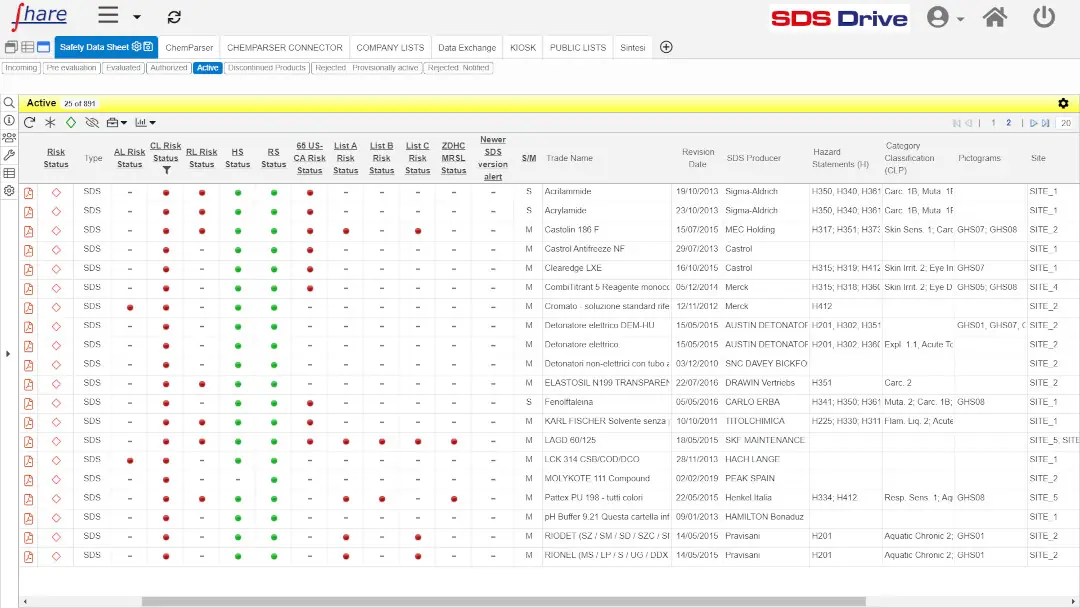
Cross Reference features to improve control
The Cross Reference feature identifies and flags all your chemical products that contain substances included in the integrated lists (one or more) that are of interest to you.
Regularly, the Cross Reference Report feature informs managers by sending reports with alerts on the changes that have occurred, namely :
-
-
- if a substance (or component of a mixture) in your chemical inventory has recently been included in one of the lists
- if the entry of a new SDS or its update includes one or more substances present in the lists
-
This means being able to stay constantly up to date on changes in the hazardous conditions of your products and being able to take timely action on prevention and protection measures.
CMR substance monitor
The system highlights the presence of carcinogenic, mutagenic, and reprotoxic (CMR) substances in SDSs in real time and supports the generation of dedicated notifications and reports.
SDS ranking
SDS-FullService classifies SDSs based on H statements and calculates a hazard index that can be used for comparative assessments of safety, health, and the environment.
Main Databases Integrated in SDS-FullService

- Candidate List (SVHC): list of candidate substances for inclusion in authorization.
- Restriction List: list of restricted substances (Annex XVII of REACH).
- Authorization List: List of substances subject to authorization (Annex XIV of the REACH Regulation)
- Registered Substances: list of registered substances as per REACH regulation.
- Harmonized List: list of harmonized substances (Annex VI of the CLP Regulation).
- POPs List: list of persistent organic pollutants (Stockholm Convention).
- PBT/vPvB List: list of substances identified as persistent, bioaccumulative and toxic (PBT) or very persistent and very bioaccumulative (vPvB)
- Endocrine Disruptor List: list of substances with potential endocrine disrupting properties.
- Diisocyanates (Restriction 74): a subset of the Restriction List (Annex XVII of REACH), highlighted as a dedicated watchlist because their presence may entail specific staff training requirements
- CLH Intentions: list of substances for which a harmonized classification or reclassification (CLH) has been proposed.
- CoRAP List: list of substances included in the Community Rolling Action Plan (CoRAP) for evaluation by member states.

California Proposition 65
OEHHA (Office of Environmental Health Hazard Assessment) CA-65: list of natural or synthetic chemicals that are carcinogenic, mutagenic, or reprotoxic

Zero Discharge of Hazardous Chemicals
ZDHC MRSL: list of restricted substances in the textile, tanning and footwear industry
OTHER DATABASES
- Drug precursor: list of drug precursors (Commission Delegated Regulation (EU) 2023/196).
- Chemical Weapons Precursors: List of chemical weapons precursors as set forth in EU Regulation 2021/821
Supplier Collaboration: communication with suppliers and manufacturers
A single conversation, tracked and archived within SDS-FullService
How do you keep track of what you ask the supplier about an SDS?
When an SDS is noncompliant, requires a revision, or is missing for a product, the request to the supplier is initiated and remains within SDS-FullService. Every message, every attached document, and every status change remains linked to the relevant SDS and is not scattered across the inboxes of the people who have handled it over time.
What triggers a request to the supplier?
The conversation with the supplier brings together in one place the cases that currently go through separate channels:
- Requests to revise SDSs deemed obsolete
- Requests for the SDS of a new product when it has never been received
- Nonconformities identified in the SDS: Once the nonconformities have been identified, you can generate the corresponding report and send it to the supplier along with the original SDS.
How do you demonstrate during an audit that you requested and received an updated SDS?
The REACH Regulation requires suppliers to update and resend the SDS without delay to recipients served in the preceding twelve months (Art. 31.9) and requires companies to retain information and records of communications with their supply chain for at least ten years (Art. 36). The recorded conversation fulfills both requirements: in the event of an inspection, the request sent, the supplier’s response, the date, and the revision received are all available. This is a prerequisite for ensuring that the correct SDS reaches workers, as required by Art. 35 and by applicable national occupational health and safety legislation.
Each supplier has access only to their own conversation, and every access is logged
The supplier responds through secure external access verified by email, without the need for an account on the platform.
Both parties can see the status of the documents (requested, delivered, rejected, unavailable) and the conversation history.
Every login and every message is logged with the date and time: this is the same traceability you need for your audit—not just another bureaucratic step.
What benefits do you get?
The revised version we received has been added to the archive of SDSs currently in use at the company, ready for digitalization, the internal approval process, and comparison with the previous version.
Communication with the supplier is no longer something that needs to be reconstructed after the fact; instead, it becomes part of the management of the SDS lifecycle, from receipt to distribution.
How to Collect Declarations of Conformity from Suppliers
You send the supplier a structured request; the supplier fills it out and attaches the necessary documents, and the data is imported into SDS-FullService already organized.
In addition to SDSs, companies often need to request declarations and other documents from suppliers, such as: REACH compliance, confirmation that no SVHC substances are present, RoHS declarations, certifications, and so on. Collecting these via email means having to chase down suppliers and ending up with responses in different formats that are difficult to compare and store.
With the Collection of Declarations of Conformity:
- Prepare a structured request for the information you need
- send it to suppliers directly from the supplier records in SDS-FullService
- You receive responses as structured data, rather than unstructured free text that is difficult to process
What can you manage from the platform?
- The form, including the fields and instructions for filling it out, even in multiple languages
- Automatic reminders, so you don't have to keep track of who hasn't responded yet
- the collection of responses as structured data and attached documents, associated with each supplier
- the supplier history, which can be reviewed over time and is available in the event of an audit.
The person filling out the form accesses it through a secure channel
The supplier fills out the form using email-verified access, without needing an account on the platform. Each submission is logged with the date and time, and the collected declarations are stored along with the rest of the documentation, in accordance with the applicable retention requirements.
Data Export and Reporting
SDS-FullService provides specific functionality for data export and report generation.
Exports can be done in various formats, such as Excel, CSV, XML, JSON.
Reports can also be obtained in various formats, such as Excel, Word, and PDF.
Selection of documents to be processed can be done via interface, choosing individual documents, or applying search parameters, including multiple ones.
In addition to being accessible via the interface, reports can also be scheduled and automatically sent to the relevant recipients.
Some reports, those most frequently requested by our clients, are already available in a standardized format. For additional needs, "custom" reports can be produced.
Integration via API / Web Services
SDS-FullService can be both fed data and queried via APIs and Web Services.
This functionality allows integration with other business applications, enabling the automation of processes regarding Safety Data Sheets (SDS), which, by being able to send and receive data in real time, enables improved efficiency and accuracy of SDS management.
For example, with APIs it is possible:
- Automatic insertion of new SDSs into the SDS-FullService database directly from other applications
- the synchronization of SDS data with connected applications, so that all information is always up to date
- querying to retrieve specific information on SDSs, thereby supporting business analysis and decisions in a timely manner
To learn more details regarding the SDS-FullService API, you can access their technical documentation at the following link.
Benefits of SDS-FullService Cloud Solutions.
24/7 Availability
Available 24 hrs a day, 7 days a week. Access information when you need it, wherever you are.
Ease of use
Use the service immediately, with no formal training required.
Tutorial & Interface
Multilingual interface. Tutorials with videos illustrating the operation of the service.
A scalable and rapidly deployable solution
Available in different configurations, suitable for all companies, including with SSO (Single Sign-On), to simplify employee enablement and automatically revoke access.
Rapid return on investment
Reduce time-consuming manual tasks and automate SDS management.
Low cost of ownership
With no software to install or maintain, with immediate access to new implementations and features.
Do you have any doubts about what SDS-FullService does.
SDS-FullService for the management of Safety Data Sheets (SDS)
Overview of Solutions and Services
Indexing of SDSs
Automatic extraction and digitalization of information from Safety Data Sheets (SDS)
Centralized SDS repository and manager
A centralized, up-to-date repository for your Safety Data Sheets (SDS): the entire company can access and manage chemical data
Ongoing monitoring of MRSLs
Continuous monitoring of your hazardous substances with cross-checking against MRSLs of interest to you and automatic notifications of changes that have occurred
Access to SDSs for all users
Access to SDSs for all workers and authorized users
Automatic delivery of SDSs
Automatic and secure delivery of SDSs to customers and all product recipients, complies with REACH reg. and CEFIC, FECC and DUCC recommendations
SDS Search & Load
Features and services to retrieve missing SDSs or necessary updates by contacting the supplier via traceable communications
Start up services
we digitalize, inventory and catalog the SDSs present in the company, eliminating duplicates, unnecessary and obsolete ones, as well as searching for missing SDSs and new versions
Professional Services
The services of our Chemical Regulatory Partners: a team of experts in REACH, CLP, health and safety, and environmental regulations